What Brake Pads Do
Brake pads press against the brake disc or rotor to slow the vehicle down. Every time you brake, the pad material wears a little. Once the pads get too thin, braking performance drops and the rotor can get damaged.
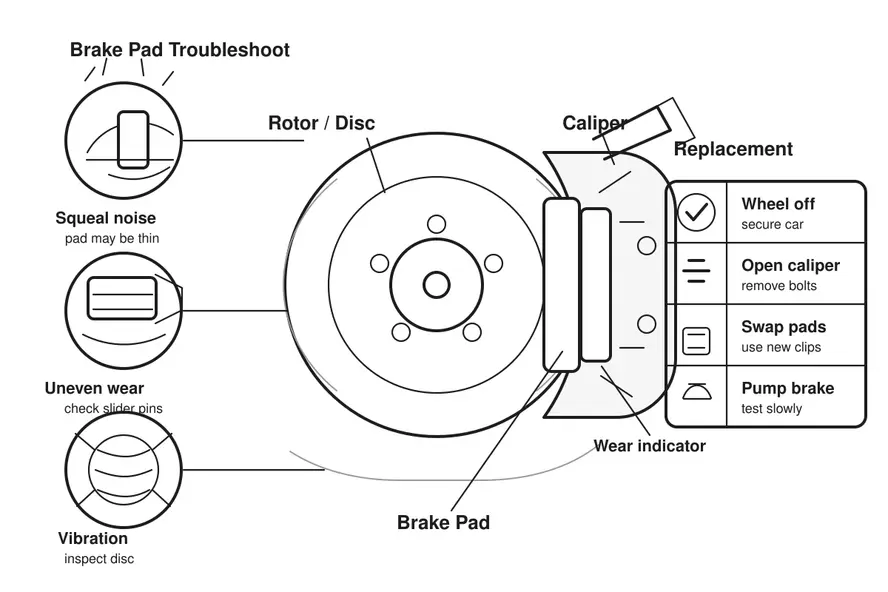
Common Brake Pad Problems
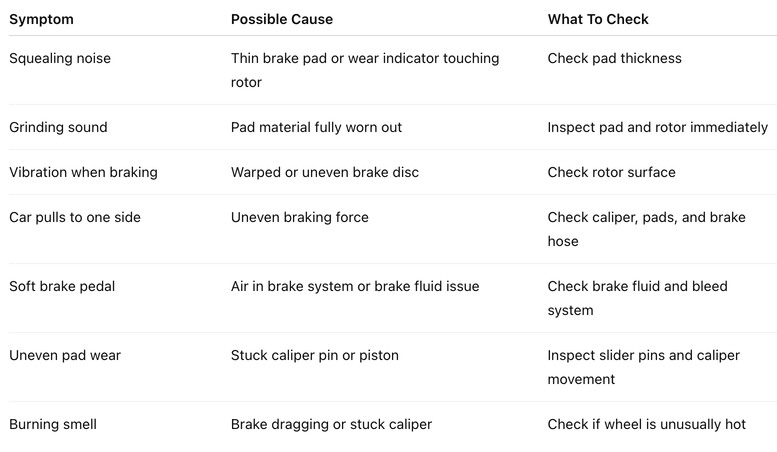
When To Replace Brake Pads
Replace the brake pads if:
- Pad material is too thin.
- You hear grinding noise when braking.
- Braking distance becomes longer.
- The brake warning light appears.
- Pads are wearing unevenly.
- The brake pedal feels strange.
- The rotor surface is badly scored.
As a rough guide, many brake pads should be replaced when the friction material is around 3 mm or less.
Tools You May Need
- Jack
- Jack stands
- Wheel chocks
- Lug wrench
- Socket set or spanner
- Brake cleaner
- Caliper piston tool or clamp
- New brake pads
- New pad clips if supplied
- Gloves
- Torque wrench if available
Before You Start
- Park on flat ground.
- Engage handbrake.
- Place wheel chocks.
- Loosen wheel nuts slightly before lifting the car.
- Lift the vehicle safely.
- Support it with jack stands.
- Never rely on the jack alone.
Brake Pad Replacement Steps
- Remove The Wheel
Loosen the wheel nuts, lift the vehicle, support it safely, then remove the wheel.
- Inspect The Brake Assembly
Check the brake pads, caliper, rotor, brake hose, and surrounding area.
Look for:
- Thin pads
- Uneven wear
- Cracked pad material
- Scored rotor
- Leaking brake fluid
- Damaged brake hose
- Rusted or stuck hardware
- Remove The Caliper Bolts
Remove the caliper bolts or slider pin bolts. Slide the caliper away from the rotor.
Do not let the caliper hang by the brake hose. Support it with a hook, wire, or place it safely nearby.
- Remove Old Brake Pads
Take out the old brake pads and clips. Compare the old pads with the new ones to make sure the shape matches.
- Check Slider Pins
The slider pins should move smoothly.
If they are dry, rusty, or stuck:
- Clean them.
- Re-grease with proper brake grease.
- Replace if damaged.
Stuck slider pins can cause uneven brake pad wear.
- Push Back The Caliper Piston
Push the caliper piston back slowly using a piston tool or clamp.
Check the brake fluid reservoir while doing this. The fluid level may rise.
- Install New Clips And Pads
Fit the new clips if supplied. Install the new brake pads into the caliper bracket.
Make sure they sit properly and move freely.
- Refit The Caliper
Place the caliper back over the new pads. Reinstall and tighten the caliper bolts properly.
- Reinstall The Wheel
Put the wheel back on. Tighten the wheel nuts by hand first, lower the vehicle, then tighten properly.
- Pump The Brake Pedal
Before driving, pump the brake pedal several times until it feels firm.
This is important because the piston needs to return to its working position.
- Do A Slow Test Drive
Drive slowly and test the brakes gently.
Check for:
- Proper braking
- No strange noise
- No pulling to one side
- No soft pedal
- No vibration
After Replacement
New brake pads may need a short bedding-in period. Avoid hard braking at first unless necessary.
A simple bedding-in process usually means doing a few gentle stops to let the pads sit properly against the rotor.
Important Safety Notes
- Do not drive if the brake pedal feels soft.
- Do not ignore grinding noise.
- Do not reuse badly worn clips.
- Do not touch the rotor surface with greasy hands.
- Do not apply normal grease to brake parts.
- Do not open brake lines unless you know how to bleed the system.
- If unsure, get a mechanic to check it.
Quick Checklist
- Pads replaced
- Clips fitted
- Slider pins moving freely
- Caliper bolts tightened
- Brake fluid level checked
- Wheel nuts tightened
- Brake pedal pumped firm
- Slow test drive completed
Final Note
Brake pads are simple, but brakes are safety-critical. If the car still vibrates, pulls to one side, makes grinding noise, or feels weak after replacement, check the rotor, caliper, fluid, and brake lines before driving further.